Building Information Modeling, commonly known as BIM, is revolutionizing the architecture, engineering, and construction (AEC) industries. It represents a shift from traditional 2D drafting to a digital 3D model-based approach that integrates information throughout the entire lifecycle of a building or infrastructure project. But what exactly is BIM, why is it important, and how can beginners understand and start working with it? This comprehensive guide will answer these questions and more.
Table of Contents
- Introduction to BIM
- The Evolution of Building Information Modeling
- What Is BIM? A Clear Definition
- Core Components of BIM
- How BIM Works: The Process Explained
- Benefits of Using BIM
- BIM Levels and Maturity
- Software and Tools for BIM
- BIM in Different Project Phases
- Challenges and Limitations of BIM
- Future Trends in BIM
- How to Get Started with BIM as a Beginner
- Conclusion
1. Introduction to BIM
In the past, building design and construction primarily depended on 2D drawings and paper-based documentation. This approach frequently led to miscommunication, errors, and costly delays. BIM emerged as a solution to digitize and streamline the entire workflow, allowing architects, engineers, contractors, and owners to collaborate more effectively.
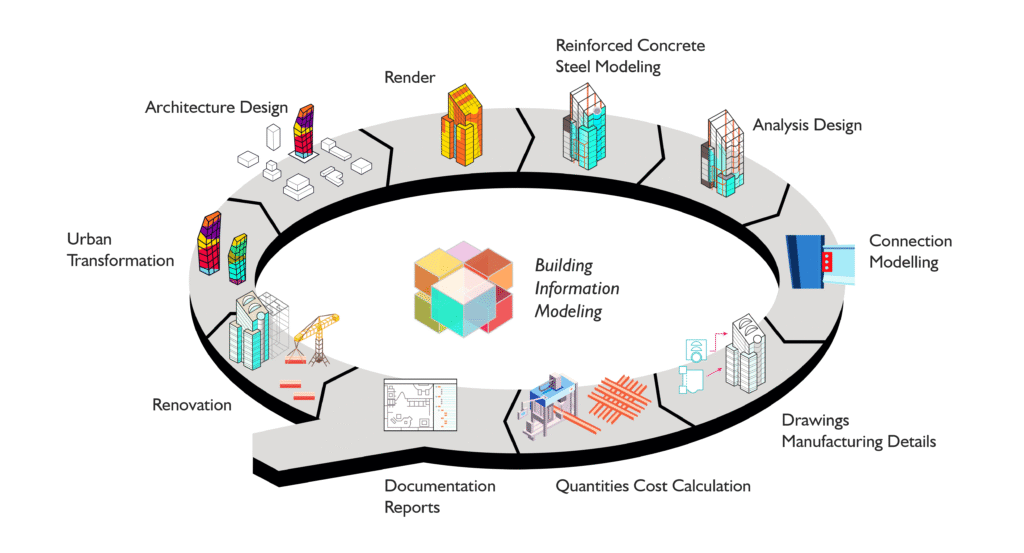
BIM is not just software or 3D modeling; it is a methodology that integrates all relevant information about a building into a single, shared digital model. This model can be used for design visualization, simulation, analysis, construction planning, and facility management.
2. The Evolution of Building Information Modeling
The concept of integrating building data into digital formats began as early as the 1970s with Computer-Aided Design (CAD). CAD allowed the creation of digital drawings but was still limited to 2D representations.
As technology advanced, 3D modeling tools appeared, enabling more realistic visualizations. However, the real breakthrough occurred with the development of software that could embed data into models — this is where BIM truly began.
Over the last two decades, BIM has evolved into a comprehensive process supported by standardized protocols and tools, becoming an industry standard worldwide.
3. What Is BIM? A Clear Definition
Building Information Modeling (BIM) is a digital process that involves the generation and management of digital representations of physical and functional characteristics of places. These digital models serve as shared knowledge resources for information about a facility, forming a reliable basis for decisions during its lifecycle — from earliest conception to demolition.
Put simply, BIM is both a technology and a collaborative process where all stakeholders involved in a project work together on a digital 3D model enriched with data.
Key aspects include:
- 3D Visualization: Models show the geometry and spatial relationships of building components.
- Information-Rich: Each element contains data such as materials, quantities, manufacturer details, and lifecycle information.
- Collaboration: Multiple disciplines (architecture, structure, MEP, contractors) contribute simultaneously.
- Lifecycle Management: BIM extends beyond design and construction to facility operation and maintenance.
4. Core Components of BIM
To understand BIM fully, it helps to know its core components:
a. 3D Modeling
At the heart of BIM is the creation of accurate, parametric 3D models that represent building elements such as walls, doors, windows, beams, HVAC systems, and more.
b. Data Integration
Each building element in a BIM model contains detailed data — dimensions, materials, cost, manufacturer, installation instructions, and maintenance schedules.
c. Collaboration Platforms
BIM uses cloud-based platforms where team members can work on the same model in real time, reducing conflicts and improving communication.
d. Simulation and Analysis
BIM models can be used to simulate energy performance, lighting, acoustics, structural integrity, and even construction sequencing.
e. Documentation and Scheduling
Automated generation of plans, sections, elevations, quantity takeoffs, and schedules helps reduce errors and saves time.
5. How BIM Works: The Process Explained
BIM works through a series of stages that align with a project’s lifecycle:
a. Concept and Design
Architects use BIM software to create initial designs, incorporating spatial and functional requirements. Stakeholders can visualize the project in 3D and make early decisions.
b. Detailed Design and Engineering
Structural, mechanical, electrical, and plumbing (MEP) engineers add their components to the BIM model. The integrated model helps detect clashes (clash detection) between disciplines early.
c. Construction Planning
Contractors use BIM to plan construction sequences, logistics, and site management. This phase may include 4D BIM, where time (schedule) is added to the model.
d. Construction Execution
The model guides on-site activities, and progress can be tracked against the model. Using BIM helps reduce errors and rework.
e. Facility Management
After construction, the BIM model serves as a detailed record for building operation and maintenance (known as 6D BIM). This helps owners manage assets efficiently.
6. Benefits of Using BIM
BIM offers numerous advantages over traditional methods:
- Improved Collaboration: Real-time sharing of up-to-date models fosters better teamwork.
- Reduced Errors and Rework: Clash detection and data consistency minimize costly mistakes.
- Enhanced Visualization: 3D models help stakeholders understand designs clearly.
- Cost and Time Savings: Automated quantities and scheduling improve budgeting and reduce project duration.
- Better Quality Control: Detailed information ensures compliance with standards.
- Sustainability: Energy and performance simulations help design greener buildings.
- Lifecycle Management: The model supports operations, renovations, and future expansions.
7. BIM Levels and Maturity
BIM adoption is often described in “levels,” which indicate the maturity of BIM implementation:
- Level 0: No collaboration; 2D CAD drawings only.
- Level 1: Managed CAD in 2D or 3D with some collaboration via common data environments.
- Level 2: Collaborative BIM where all parties create their own 3D models but share data in a common environment. Most current BIM projects are Level 2.
- Level 3: Fully integrated BIM with a single, shared model accessible by all stakeholders. This vision is sometimes called “Open BIM.”
Countries such as the UK have mandated Level 2 BIM for public projects, accelerating industry-wide adoption.
8. Software and Tools for BIM
Many software platforms support BIM workflows. Some of the most popular include:
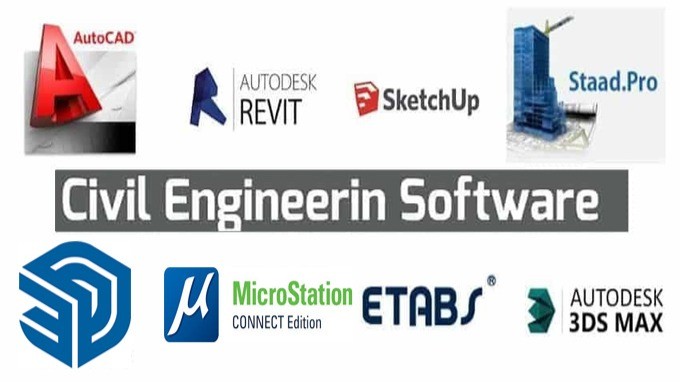
- Autodesk Revit: Widely used for architectural design and engineering.
- Navisworks: For clash detection and construction simulation.
- Archicad: A BIM tool popular among architects.
- Bentley Systems: Known for infrastructure and civil engineering projects.
- Tekla Structures: Focused on structural engineering and steel detailing.
- Vectorworks: Combines BIM with CAD capabilities.
Additionally, cloud collaboration platforms like BIM 360 and Trimble Connect enable real-time cooperation.
9. BIM in Different Project Phases
Design Phase
BIM enhances creativity and precision. Designers can experiment with forms, materials, and systems while instantly understanding the implications.
Pre-Construction Phase
Estimators and planners use BIM for accurate cost estimation and scheduling through 5D (cost) and 4D (time) BIM capabilities.
Construction Phase
Site teams use BIM to coordinate deliveries, assembly, and installation, reducing delays and waste.
Operations and Maintenance
Facility managers access the BIM model to monitor systems, plan maintenance, and manage assets effectively.
10. Challenges and Limitations of BIM
Despite its benefits, BIM faces some challenges:
- Initial Costs and Training: Software and training can be expensive and require time.
- Cultural Resistance: Shifting to BIM requires changes in workflows and mindsets.
- Data Management: Ensuring consistent and accurate data input is critical.
- Interoperability: Different software may have compatibility issues.
- Legal and Contractual Issues: Defining responsibilities for model data and intellectual property can be complex.
11. Future Trends in BIM
BIM continues to evolve with new technologies:
- Integration with IoT: Real-time sensor data can update BIM models for smart building management.
- Artificial Intelligence: AI can automate design optimization and detect issues.
- Virtual and Augmented Reality: Immersive experiences enable better stakeholder engagement.
- Generative Design: Automated design generation based on parameters.
- Digital Twins: Real-time digital replicas of buildings that mirror operations.
12. How to Get Started with BIM as a Beginner
Step 1: Understand the Basics
Learn what BIM is and why it matters. Many free online resources, webinars, and introductory courses are available.
Step 2: Choose the Right Software
Start with beginner-friendly BIM tools such as Autodesk Revit or Archicad. Many offer trial versions or student licenses.
Step 3: Learn Through Tutorials and Practice
Follow tutorials and practice creating simple projects. Focus on understanding parametric modeling and information embedding.
Step 4: Join Communities and Forums
Engage with BIM communities online to ask questions and stay updated.
Step 5: Apply BIM in Real Projects
Try to use BIM in small projects or internships to gain practical experience.
Step 6: Keep Learning
BIM is a broad field, so continuous learning and adapting to new tools and